StepFun Free API Review: 27 Models for Claude Code, Codex, Hermes & Cursor — Up to 90 Days
Hands-on review of StepFun's free Mini Plan: 27 models with OpenAI-compatible API for Claude Code, Codex CLI, Hermes Agent, and Cursor. Step 3.7 Flash multimodal flagship + Step Image Edit 2 hands-on (KRIS-Bench #1). Up to 90 days free. Promo ends July 18.
A Free API That Actually Works with Claude Code
If you’ve been hunting for free AI API credits, you know the drill: sign up, grab a key, set your env vars, run a couple requests, hit the rate limit. StepFun (阶跃星辰) is running a limited-time promo right now that’s a cut above — register and you get their Mini Plan with full API access to all 27 public models. No crippled trial. I signed up on June 28th. The dashboard shows the plan is valid until July 13th, plus a separate ¥15 credit (~$2) good through September 26th. Two independent quotas.
When your quota runs out, you can claim more. The maximum is 90 days of free access. At the Mini Plan’s regular price of ¥49/month ($7), that’s a three-month subscription worth ¥147 ($20) for free. The promo ends July 18th — about 20 days left.
Sign up: platform.stepfun.com
27 Models: Text, Multimodal, Voice, and Image
The Mini Plan covers more ground than I expected. Beyond text LLMs, you get real-time voice, TTS, ASR, and image generation/editing — basically a full-stack multimodal API platform. Rate limits are uniform across all models: 5 concurrent requests, 10 RPM, 5M TPM. The 5M TPM is essentially unlimited for personal use, but 10 RPM means you’ll need to queue high-frequency agent loops.
Full model lineup:
| Category | Model | Context / Params | Key Feature |
|---|---|---|---|
| Reasoning / Multimodal | Step 3.7 Flash | 256K | Native image + video understanding, 3 reasoning levels |
| Reasoning / Text | Step 3.5 Flash | 256K | Stable tool calling, long-chain tasks |
| Reasoning / Agent | Step 3.5 Flash 2603 | 256K | High-frequency agent optimization, low-reasoning mode |
| Vision | Step-1o Turbo Vision | 32K | Image/video understanding, up to 60 images |
| Image Editing | Step Image Edit 2 | 6B | Text-to-image + editing, KRIS-Bench #1 |
| Image Generation | Step 2X Large | — | Strong Chinese/English text rendering |
| Realtime Voice | StepAudio 2.5 Realtime | — | Voice-to-voice, paralinguistic perception |
| Chat | StepAudio 2.5 Chat | — | Voice input, text output |
| TTS | StepAudio 2.5 TTS / Step TTS Mini | — | Context-aware + zero-shot voice clone |
| ASR | StepAudio 2.5 ASR | 4B MTP | 5 min audio transcribed in 1 second |
There are also Step 2 series models (step-2-16k, step-2-mini) — older, lighter, shorter context. Fine for simple tasks.
Connecting to Claude Code / Codex / Hermes / Cursor
The API is OpenAI-compatible, which is the prerequisite for it to work directly with Claude Code, Codex CLI, Hermes Agent, Cursor, Cline, Cherry Studio, and Open WebUI. Here’s how to set up each tool.
Claude Code
Configure via environment variables:
export ANTHROPIC_BASE_URL=https://api.stepfun.com/v1
export ANTHROPIC_API_KEY=your_key_here
You can also use cc-switch to swap backend models without manually editing env vars each time.
Codex CLI
OpenAI Codex recently announced third-party model support, with the caveat that providers must natively support the /v1/responses endpoint. StepFun’s API currently uses the Chat Completion format. If Codex requires strict Responses API compatibility, you may need a bridging proxy like free-claude-code or openrelay for format conversion.
Basic config:
export OPENAI_BASE_URL=https://api.stepfun.com/v1
export OPENAI_API_KEY=your_key_here
Use model name step-3.5-flash or step-3.7-flash.
Hermes Agent
Hermes is an open-source, self-improving AI agent by Nous Research. It has built-in Claude Code and Codex Skills that can be activated with 4 commands. It supports custom API providers and is ideal for developers who want long-term memory and skill accumulation.
Point Hermes to StepFun’s API endpoint and key, select step-3.5-flash or step-3.7-flash as the model. The advantage of Hermes is that it automatically extracts reusable skills from complex tasks — paired with StepFun’s free quota, your agent development testing costs nothing. Hermes also supports MCP reverse serving, so you can expose StepFun’s model capabilities to other AI coding assistants.
Cursor / Cline / Continue
These IDE plugins all support custom API endpoints. In settings, fill in:
- Base URL:
https://api.stepfun.com/v1 - API Key: your StepFun key
- Model:
step-3.5-flashorstep-3.7-flash
Cherry Studio / Open WebUI
These desktop/web clients also support custom API endpoints. Add StepFun’s address and key in the model management or API settings. The format is identical to OpenAI.
In actual testing, Step 3.5 Flash’s function calling format has high compatibility with OpenAI — most code written with the OpenAI SDK works without modifications. The 3.7 Flash multimodal uses the same Chat Completion interface, just with image_url type in messages.
Choosing a Text Model: Step 3.7 Flash vs 3.5 Flash vs 3.5 Flash 2603
The three Flash variants serve different purposes. Pick the wrong one and you’ll waste tokens or get slower responses.
Step 3.7 Flash is the latest flagship — 256K context, native multimodal input (images and video without a separate vision model), and three switchable reasoning intensity levels (low / medium / high). I ran code generation and task planning on medium and got good quality-speed balance. First choice for complex agent scenarios.
Step 3.5 Flash is the previous generation — same 256K context, text-only reasoning. Tool calling is stable and long-chain task performance is solid. If you don’t need multimodal, it burns fewer tokens than 3.7 Flash.
Step 3.5 Flash 2603 is optimized for high-frequency agent calls — better token efficiency plus a low-reasoning mode. If you’re primarily using Codex or Claude Code for coding tasks, this version is the best fit. Low-reasoning mode gives faster responses.
Compared to peers, Step 3.5 Flash sits in the same tier as Kimi K2.5 and Qwen3-Max on DataLearner benchmarks, with a clear cost advantage thanks to the free quota.
Step Image Edit 2: Hands-On Image Editing
This is where I spent the most time testing. Step Image Edit 2 is StepFun’s latest lightweight image editing model — 3.5B parameters, top of the KRIS-Bench leaderboard, claiming to outperform 12B-20B class open-source models. Text-to-image and image editing in one model, 1-2 second response time.
I ran a test suite on a flat-design landscape image, covering annotation, style transfer, and object addition.

Annotation Editing
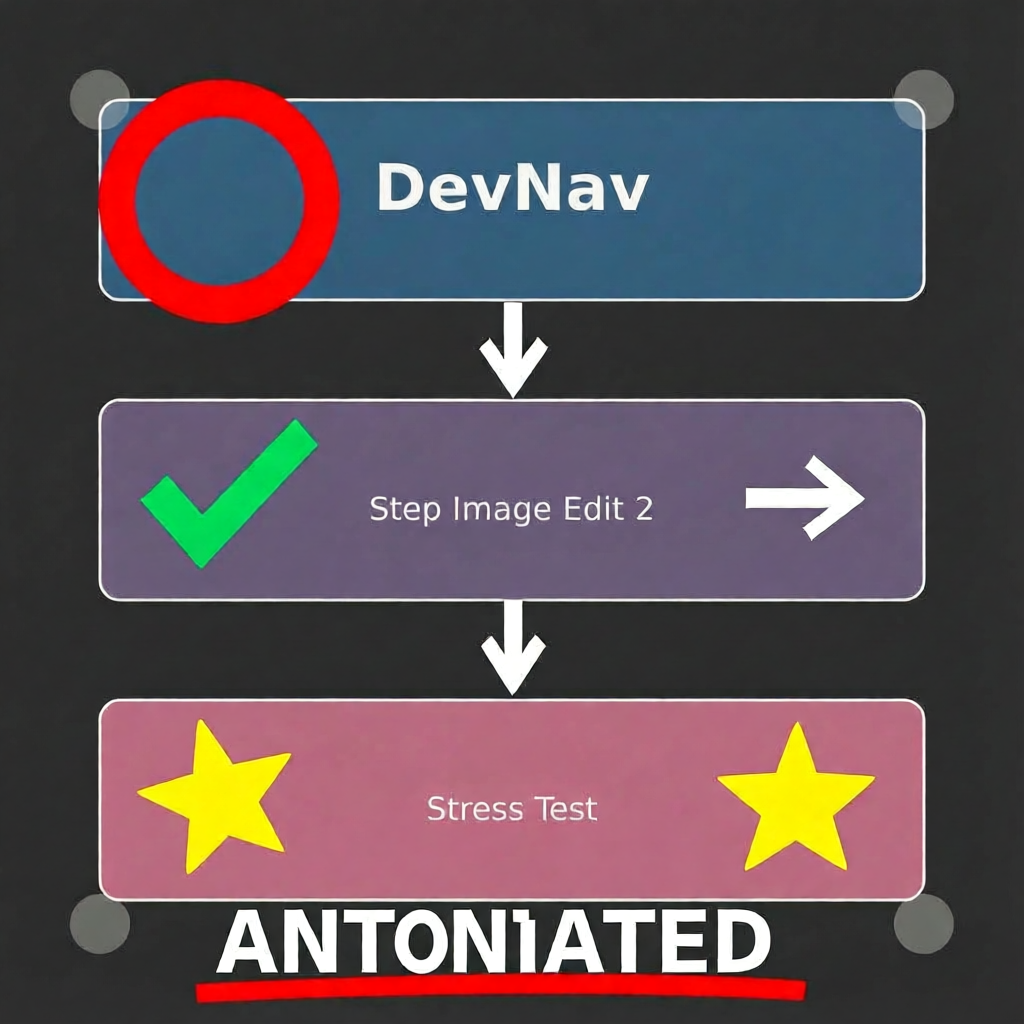
Asked the model to add arrows, circles, stars, and text labels to images with various parameter settings.
English prompt at cfg=3.0 performed well — annotation positions were accurate, and the model even rearranged elements into a flowchart layout. Text generation had issues though: “ANNOTATED” came out as “ANTONIATED”.
Also tried annotating a blog card (circling tags, adding arrows, placing emoji) — usable but rough on details.
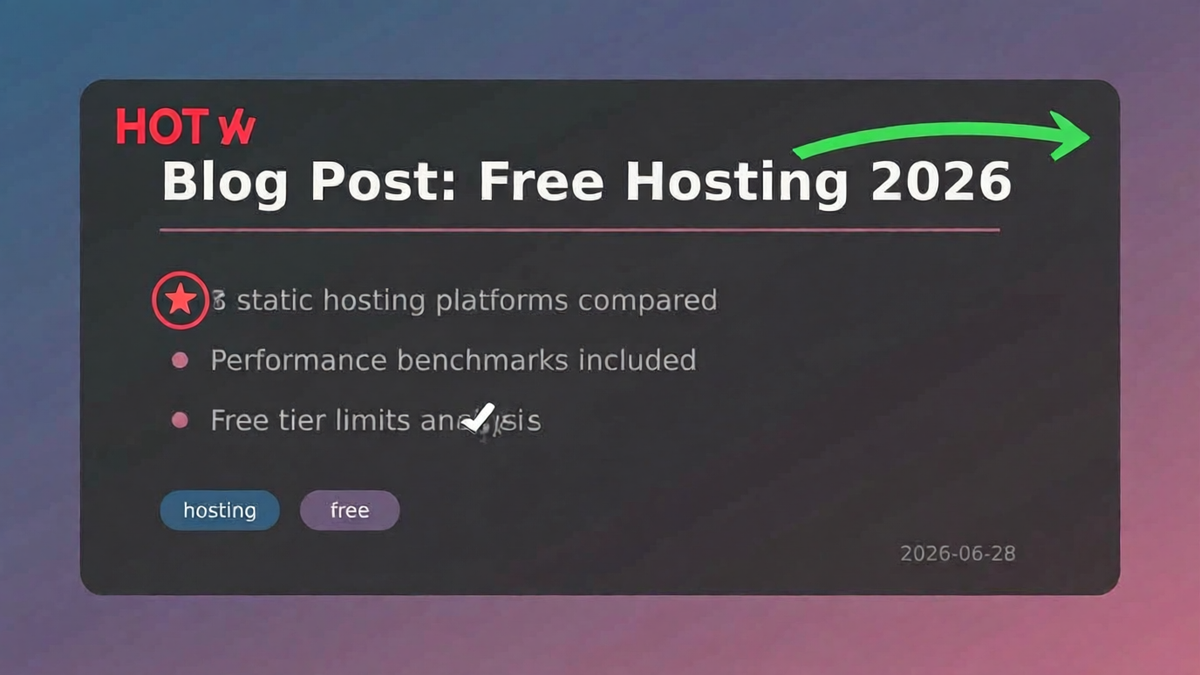
Spatial understanding and directional placement are fine. Text rendering is a clear weak point — anything requiring precise text still needs manual post-processing.
Style Transfer
Used the green landscape to test two directions.
Sunset style (prompt: warm orange/pink sky, golden lake reflection, glowing clouds, purple mountains) — the result is genuinely pretty. Sky becomes a purple-orange gradient, sun has radiating light beams, lake has a complete reflection. Overall quality a tier above the original.

Cyberpunk (prompt: neon pink/cyan lights, digital particles) — the model completely repainted the image. Neon skyscrapers reflected in water, full synthwave aesthetic. You’d never guess the original was a green minimalist landscape.

Both style transfers exceeded expectations for a 3.5B model. Color, composition, and lighting are all handled well. The “rivals 12B-20B” claim held up in these two tests at least.
Object Addition
Asked the model to “add a red sailboat and birds, change the lake to turquoise, keep the mountains and trees.” All instructions were followed accurately. The added objects matched the original art style with no visual discord.

StepAudio 2.5: Quick Voice Model Test
The platform includes a full voice stack — Realtime (voice-to-voice), Chat (voice input, text output), TTS, and ASR.
The Realtime model claims to detect hesitation and emotional shifts in tone. I had a few rounds of conversation and the responses were noticeably more natural than traditional TTS — less robotic. The main competitors in this space are Alibaba’s CosyVoice and ByteDance’s Volcano Voice.
ASR uses 4B parameters + MTP (Multi-Token Prediction) architecture. Official claim: 5 minutes of audio transcribed in under 1 second. I tested a 2-minute recording — it was indeed fast, and recognition accuracy was good.
TTS comes in two versions: StepAudio 2.5 TTS is the flagship with Global Context + Inline Context dual-mode control and zero-shot voice cloning; Step TTS Mini is lighter with 19 official voices supporting Chinese, English, Japanese, Cantonese, and Sichuan dialect.
What the Free Quota Is Actually Worth
The Mini Plan’s initial 15-day trial can be renewed, up to a maximum of 90 days cumulative. At the regular price of ¥49/month ($7), 90 days equals a three-month subscription worth ¥147 ($20). Add the ¥15 credit (valid through late September) and you’ve got a decent buffer for personal development and testing.
The downsides: 5 concurrent connections and 10 RPM are hard caps — fine for prototyping and daily use, not suitable for production batch processing. Some official doc examples are in JSX format (written for their doc site), so you’ll need to convert them for regular projects.
The promo ends July 18th. If you need free API credits for development testing, or want to see where Chinese AI models stand now, there’s still time to sign up.
Tool Compatibility at a Glance
Not every tool gets the same capabilities when connected to StepFun’s API. This chart maps 6 major tools across four dimensions: text generation, function calling, multimodal input, and agent/MCP support.

FAQ
What happens after the free Mini Plan expires? You can renew your quota up to 90 days cumulative. After 90 days, the Mini Plan costs ¥49/month (~$7).
Which clients and tools are supported? The API is OpenAI-compatible. It works directly with Claude Code, Codex CLI, Hermes Agent, Cursor, Cline, Continue, Cherry Studio, Open WebUI, and any tool that supports custom API endpoints.
What is Hermes Agent and how does it work with StepFun? Hermes is an open-source, self-improving AI agent by Nous Research with built-in Claude Code and Codex Skills. Point it at StepFun’s API endpoint and key — done. Hermes auto-extracts reusable skills from complex tasks, so the free quota goes a long way for agent development. It also supports MCP reverse serving.
What’s the difference between Step 3.7 Flash and Step 3.5 Flash? 3.7 Flash is the latest flagship with native multimodal input (image + video understanding) and three reasoning levels. 3.5 Flash is text-only with lower token consumption. Need images/video? Go 3.7. Pure code/text? 3.5 is more economical.
Can Step Image Edit 2 be used commercially? The free quota covers development and testing. For commercial use, check StepFun’s terms of service and pricing.
How does this compare to free models on OpenRouter? Free models on OpenRouter typically have strict rate limits and long queues. StepFun’s Mini Plan gives you 10 RPM + 5M TPM — much more generous for personal use, with broader model coverage (text + voice + image in one platform).
Comments
Join the conversation
A quiet margin for reflections after reading.
No comments yet. Be the first to leave a thought.